✦ Crypto payment gateway
A wallet payment gateway at 0.1%
Accept payments wallet to wallet at a flat 0.1% per transaction, with non-custodial mode letting you hold the private keys and receive funds directly on-chain.
Accept your first crypto payment today in 3 Easy Steps
Create your Zeno account with your email, pick your setup, and receive your first crypto payment the same morning.
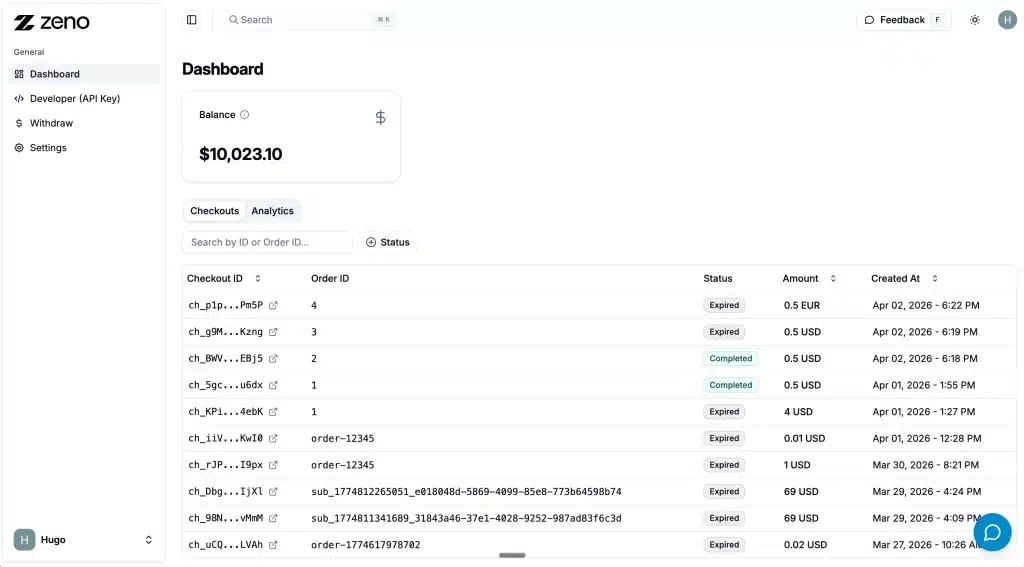
1. Create Your Zenobank Account
Create your free account at dashboard.zenobank.io
2. Install a plugin, or integrate directly with our API
Connect through a plugin for WooCommerce, Shopify, and other platforms, or integrate directly using our SDKs and API.
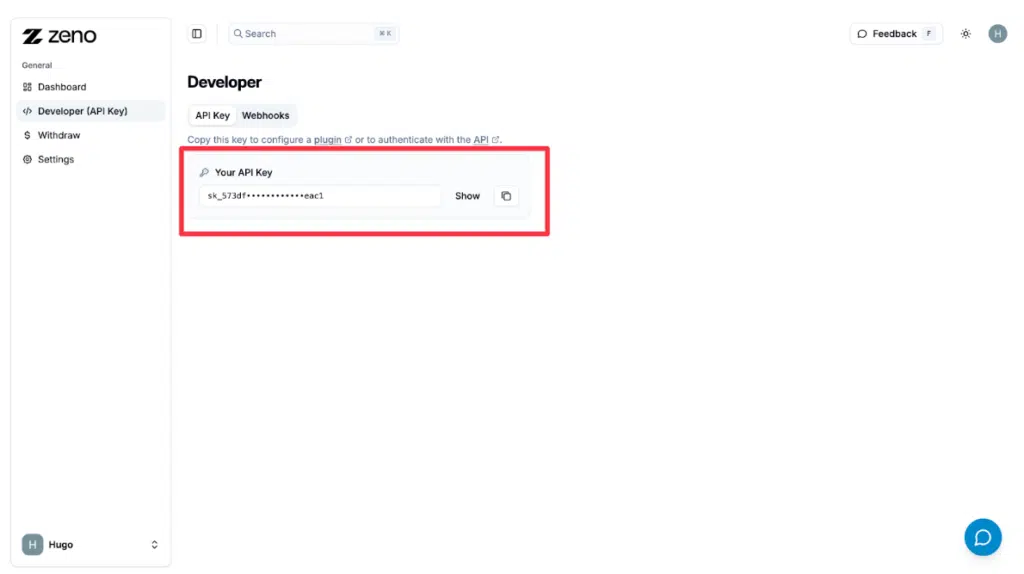
3. Get Your API Key
In the dashboard, go to Developer and copy your API key.
Paste it into the plugin setting or use it via the API.
Depending on your integration, paste it into your plugin settings or use it directly in your code.
What wallet-based payment processing gives your business
-
Funds settle directly to your wallet.
-
Non-custodial mode
-
Customers pay from any major crypto wallet (MetaMask, Trust Wallet, Phantom, Coinbase Wallet, Binance, Ledger, and dozens more)
How wallet-to-wallet payments work
Supported wallets and networks
Zeno supports Ethereum, Solana, Tron, BSC, Arbitrum, Base, Polygon, Bitcoin, Litecoin, and Lightning Network across the wallet types above.
| Wallet category | Examples | Networks supported |
|---|---|---|
| Self-custody software wallets | MetaMask, Trust Wallet, Phantom, Coinbase Wallet | All Zeno-supported networks |
| Hardware wallets | Ledger, Trezor | All Zeno-supported networks |
| Exchange-linked wallets | Binance, Coinbase, Kraken | Network depends on exchange |
| Mobile wallet apps | Most QR-scannable wallet apps | All Zeno-supported networks |
| Lightning wallets | Phoenix, Wallet of Satoshi, Muun | Bitcoin Lightning Network |
FAQs
Everything you need to know before getting started
In non-custodial mode, you hold the private keys to the wallet receiving payments, which means the funds are in your direct control at all times. In custodial mode, Zeno manages the wallet and you withdraw to your bank or external wallet from the dashboard. Both modes carry the same 0.1% transaction fee.
Customers can pay from any major crypto wallet, including MetaMask, Trust Wallet, Phantom, Coinbase Wallet, Binance, Ledger, Trezor, and most QR-scannable mobile wallet apps. The checkout displays a QR code and address, and the customer's wallet handles the rest.
Yes. In non-custodial mode you can use any wallet address as your receiving wallet, including addresses controlled by hardware devices like Ledger or Trezor. Funds settle directly on-chain, which means they land at the address you specify regardless of how that wallet is custodied on your end.
Between 2 seconds and 2 minutes depending on the blockchain. USDT on Tron confirms in 3-5 seconds, USDC on Base or Solana in under a minute, and USDT on Ethereum in 1-2 minutes. The funds appear in your receiving wallet the moment the network confirms the transaction.
Yes. The custody mode is a setting in your dashboard that you can change at any time. Existing balances stay where they are when you switch, and new incoming payments route according to your current setting.
Three main options. Hold stablecoins (USDT, USDC, PYUSD) as USD-equivalent balances. Transfer to a fiat bank account directly through Zeno. Or send to any external wallet, including exchange wallets that handle fiat conversion themselves.
No. Customers pay from their own wallets without creating any account on Zeno's side. The payment flow runs entirely through their existing wallet, which means there's no signup friction on the customer side of the transaction.
The 0.1% Zeno fee is the same regardless of which wallet your customer pays from or which wallet you receive to. Network fees on the blockchain are paid by the customer at the moment of payment and vary by network (Tron and Solana sit at fractions of a cent, Ethereum mainnet runs higher).
Receive payments straight to your wallet
Take payments wallet to wallet at a flat 0.1% per transaction with non-custodial mode keeping the private keys in your hands.